Best meta-analysis software in 2026: RevMan, R, JASP, Stata and the rest, compared
So you've got your studies, and everyone is telling you to use a different program. Here's every meta-analysis tool worth a look in 2026: what it costs, what it can and can't do, whether RevMan is really free, and which one fits your situation, so you choose once and finish.
Key takeaways
- For most students, the best meta-analysis software in 2026 is R with the meta or metafor package: it's free, it covers everything a first meta-analysis needs, and it goes on to network and Bayesian meta-analysis when you're ready. JASP is the best free option if you'd rather click than code.
- RevMan isn't free for most people. It's free for authors on Cochrane reviews and for people living in Research4Life countries (India isn't one); everyone else pays £130 a year, £100 for academics or £80 for students, plus VAT in the UK and EU (October 2026).
- Don't start a new review in RevMan 5: Cochrane no longer supports it, and it lacks the newer random-effects options (REML, HKSJ and prediction intervals) that the current version has.
- Stata, CMA and SPSS are paid, so use them when your department already has a licence. MetaXL and Meta-Essentials are free but limited, and OpenMeta[Analyst] hasn't been updated since 2020.
- Meta-analysis software only does the analysis. Screening and extraction happen earlier, in tools such as Covidence, Rayyan or EPPI-Reviewer, and every hand-off between tools costs you time.
- Whichever you use, report the program and package versions, the between-study variance estimator and the confidence interval method, as PRISMA 2020 asks.
What is the best meta-analysis software in 2026?
For most medical students, the best meta-analysis software in 2026 is R with the meta or metafor package: it's free, it runs every analysis a first meta-analysis needs, and it grows with you into network and Bayesian methods. If you'd rather click than code, JASP is the best free option. RevMan is the gentlest start when it's free for you, and Stata, CMA or SPSS make sense when your department already pays for one.
A meta-analysis pools the results of several studies into one estimate. The software only does that last step: the forest plot (the standard chart of each study's result and the pooled estimate), the heterogeneity statistics and the sensitivity analyses. Everything before it, from screening records to extracting the numbers, happens in other tools, which we cover further down.
Here's how the main options compare, from their official pages as we checked them on 28 October 2026. Tau Square Academy publishes this guide and makes Tau Square Studio, which is in the last row.
| Software | Cost (October 2026) | How you use it | Best for | Main gaps |
|---|---|---|---|---|
| R with meta or metafor | Free (R Project) | Code, on Windows, Mac or Linux | Most students, and anything beyond the basics | Slower to learn; no menus |
| JASP | Free (JASP) | Point-and-click, on Windows, Mac or Linux | Free menus, with metafor doing the statistics | No network meta-analysis yet |
| RevMan (web version) | Free for Cochrane review authors and Research4Life countries; otherwise £80 to £130 a year, plus VAT in the UK and EU (Cochrane) | Point-and-click, in your browser | Cochrane-style two-group comparisons | No meta-regression, funnel-plot tests, network or Bayesian meta-analysis |
| jamovi with the MetaJam module | Free (jamovi) | Point-and-click | Free menus built on the meta package | The module is still being developed |
| Stata | Student licence (Stata/BE) from US$48 for 6 months or US$94 a year (StataCorp) | Menus or code | Departments that already use Stata | No official network meta-analysis command |
| Comprehensive Meta-Analysis (CMA) | Paid; check the current student price on meta-analysis.com | Point-and-click | Teams that already work in it | What you get depends on the edition |
| IBM SPSS Statistics, version 28 or later | Paid (IBM) | Menus | Colleges that already license SPSS | No network or Bayesian meta-analysis |
| MetaXL | Free Excel add-in (EpiGear) | Excel, Windows only | Quick pooled estimates in Excel | No REML option listed; latest dated notice from 2019 |
| Meta-Essentials | Free for non-commercial use (Erasmus University) | Excel workbooks | Simple meta-analyses | No meta-regression with several moderators |
| OpenMeta[Analyst] | Free (GitHub) | Point-and-click | Reopening old projects made in it | Not updated since 2020; needs Python 2.7 |
| Tau Square Studio | Only for Tau Square Academy students (Tau Square Studio) | Point-and-click in Chrome or Edge, with R's metafor underneath | Screening to analysis in one workspace | No network or Bayesian meta-analysis yet |
The sources for each row are linked in the sections below.
Is RevMan free in 2026?
No, not for most people. As of October 2026, Cochrane gives RevMan (Review Manager, its software for writing systematic reviews and running meta-analyses) free only to authors working on Cochrane reviews and to people living in Research4Life countries; everyone else pays a yearly subscription of £130, £100 for academics or £80 for students, plus VAT in the UK and EU (Cochrane RevMan pricing).
There are four ways to use RevMan without paying the full price:
- You're an author on a Cochrane review
- You live in a Research4Life country
- Your university pays for it
- You only want to try it
You're an author on a Cochrane review: Access is free while you work on a Cochrane review. Use RevMan for a non-Cochrane review and you get a discount instead (Cochrane).
You live in a Research4Life country: Research4Life is a partnership that gives institutions in lower-income countries free or low-cost access to research. Cochrane uses its country lists, and your free or discounted rate shows when you log in (RevMan Knowledge Base). India isn't on them (see below).
Your university pays for it: Some organisations sponsor free access for their students, so ask your library first (RevMan Knowledge Base).
You only want to try it: A practice review is free, but it's deleted after 30 days, can't be exported and allows only one person (Cochrane). It's for learning the buttons, not your real project.
You'll still see RevMan called "free software" in older tutorials, some library guides and AI answers. For the current version, that's only true for the people above: Cochrane opened the web version to non-Cochrane reviewers in January 2023 as a paid service (Cochrane news, 2023).
If you do pay, check these four things first:
- The student rate depends on your Cochrane Account
- Cochrane membership takes 10% off, and it's free to earn
- You pay in pounds, 12 months at a time
- GRADEpro isn't connected for non-Cochrane reviews
The student rate depends on your Cochrane Account: Update your profile to show you're a student, then log in; the discounted rates only appear once you're logged in (Cochrane).
Cochrane membership takes 10% off, and it's free to earn: You earn it by volunteering: 1,000 points in any 12 months gets you a year's membership, and screening on Cochrane Crowd, Cochrane's volunteer platform for sorting study records, earns 1 to 2 points per record (Cochrane membership). Check at checkout whether it combines with the student rate. The screening practice is useful anyway.
You pay in pounds, 12 months at a time: Your bank's exchange rate and card fees apply. If you cancel within 14 days without having opened RevMan, you get a refund (subscription terms).
GRADEpro isn't connected for non-Cochrane reviews: GRADEpro, the tool for rating the certainty of evidence and building "Summary of findings" tables, isn't linked to RevMan for non-Cochrane reviews (RevMan Knowledge Base). Use it separately; its free plan covers groups of up to three researchers (GRADEpro).
Can students in India get RevMan free through Research4Life?
No. Research4Life excludes any country with a total gross national income (GNI, roughly the total income of a country's residents) above US$1 trillion "regardless of other factors", and India's was about US$4 trillion in 2025 (Research4Life criteria; World Bank). So the Research4Life route that some blogs and AI answers suggest doesn't apply to students living in India (as of October 2026).
There's a twist for Indian students studying abroad. Research4Life's Group A countries get free access and Group B countries low-cost access, and the lists include Nepal, Bangladesh and Kyrgyzstan (Group A) and Georgia and Uzbekistan (Group B), as we checked them on 25 October 2026 (Research4Life eligibility). If you're doing your MBBS in one of them, put the country you actually live in on your Cochrane Account and check what you're offered. The lists change (a few countries move on 1 January 2027), so check again before you renew.
If you live in India, ask your college library about sponsored access, pay the student rate for one year planned around your analysis, or use R, which is free.
Should you still use RevMan 5?
No. Cochrane's style manual says RevMan 5 "is no longer supported by Cochrane", its last version (5.4) dates from 2020, and we couldn't find an official download in October 2026 (Cochrane Style Manual). "Free download" sites aren't Cochrane, and you can't tell what's bundled with the file. RevMan 5 also misses three random-effects options that the web version added after its last release (RevMan release notes). A random-effects model assumes the true effect differs a little from study to study, and these three make it more accurate:
- REML: restricted maximum likelihood, a more reliable estimate of how much the true effects vary than the older DerSimonian and Laird method, and now RevMan's default (Cochrane Handbook, chapter 10; Langan et al., 2019).
- The HKSJ adjustment: the Hartung-Knapp-Sidik-Jonkman method, which usually gives more accurate confidence intervals for the pooled effect (IntHout et al., 2014), though the Cochrane Handbook advises comparing methods when you have only two or three studies.
- Prediction intervals: where the effect in a new study would probably fall, which the Handbook encourages with about five or more studies.
Already have work in RevMan 5? The current RevMan can create a new review from a .rm5 file (Managing your reviews), and R's meta package can read RevMan 5 files and reproduce RevMan 5's settings (meta documentation).
What can R do that RevMan can't?
R can run network meta-analysis, meta-regression, Bayesian meta-analysis and tests for funnel-plot asymmetry, and it can estimate means and standard deviations (SDs) from medians and interquartile ranges; RevMan does none of these, as of October 2026. Here's each, with the R package to use:
- Network meta-analysis: comparing three or more treatments at once, including pairs never tested head to head. RevMan "currently does not have the capability" (RevMan Knowledge Base). In R: netmeta.
- Meta-regression: testing whether a study characteristic, such as dose or mean age, explains why results differ. It isn't implemented in RevMan (Cochrane Handbook, chapter 10). In R: metafor or meta.
- Funnel-plot asymmetry tests: a funnel plot charts each study's effect against its precision, and tests such as Egger's check whether small studies show bigger effects, a possible sign of publication bias. RevMan draws the plot but has none of the recommended tests (chapter 13). In R: meta or metafor.
- Bayesian meta-analysis: combining your data with prior information to get answers as probabilities, such as the chance a treatment helps. It isn't among RevMan's documented methods. In R: bayesmeta or brms.
- Medians and IQRs: the interquartile range (IQR) is the spread of the middle half of the values. RevMan's calculator converts standard errors and confidence intervals into SDs, but lists no median or IQR conversion (RevMan calculator). In R: metacont() in meta or conv.fivenum() in metafor.
- Single-group proportions: such as the prevalence of a condition. RevMan's methods compare an experimental group with a control group (statistical methods); in R, metaprop() in meta pools them.
R itself is a free programming language for statistics (R Project), and two packages do most of the work:
- meta, the friendlier start
- metafor, the engine for complex models
meta, the friendlier start: One function per type of data, sensible defaults, and presets such as settings.meta("RevMan5") that reproduce RevMan's analyses (meta 8.5-0; documentation).
metafor, the engine for complex models: Multilevel and multivariate models, network meta-analysis and selection models for publication bias (metafor 5.2-1; Viechtbauer, 2010). JASP and jamovi's MAJOR module run it underneath.
Your analysis lives in a script, so when a peer reviewer asks you to add a study, you rerun it in seconds, and anyone can check what you did. The catch is the start: expect your first week to feel slow. As we like to say, fast is slow, slow is smooth, and smooth is fast. Start with the free book Doing Meta-Analysis in R (Harrer and colleagues, 2021) and the tutorial by Balduzzi, Rücker and Schwarzer (2019), which runs a full analysis in meta.
Which free point-and-click programs are worth using?
JASP is the free point-and-click program we'd pick for most students, with jamovi a reasonable second if you choose its module carefully. The Excel-based options are more limited, and OpenMeta[Analyst] is no longer maintained. Here's where each fits:
- JASP, the one we'd pick
- jamovi, if you pick the right module
- MetaXL and Meta-Essentials, for simple analyses in Excel
- OpenMeta[Analyst], which we'd now avoid
JASP, the one we'd pick: JASP is free and open source, and its Meta-Analysis module is a front end for metafor, with REML and the Knapp-Hartung adjustment by default, forest and funnel plots, subgroups, meta-regression, Egger's test, trim-and-fill, and Bayesian meta-analysis alongside (Bartoš, Wagenmakers and Viechtbauer, 2025; JASP features). Network meta-analysis is listed as planned, not available, and we didn't find median conversion in its features.
jamovi, if you pick the right module: jamovi is free and does meta-analysis through add-on modules (jamovi). MetaJam, built on the meta package, covers two-group, single-group and ready-calculated effect sizes, with risk-of-bias plots (jamovi library). The older MAJOR module, built on metafor, has had maintenance problems: users were still reporting errors in January 2026 (jamovi forum). Name the module and its version in your methods.
MetaXL and Meta-Essentials, for simple analyses in Excel: MetaXL is a free Excel add-in that runs only on Windows. It offers DerSimonian and Laird random effects plus its makers' own inverse-variance heterogeneity and quality-effects models, lists no REML option, and the latest dated notice on its page is from 2019 (EpiGear). Meta-Essentials is a set of free Excel workbooks for non-commercial use; it applies the Knapp-Hartung adjustment automatically and covers subgroups and publication bias, but its makers describe it as suited to "relatively straightforward meta-analyses" (Erasmus University; Suurmond et al., 2017).
OpenMeta[Analyst], which we'd now avoid: It's free and was once popular, but its code hasn't changed since July 2020 and it depends on Python 2.7 (GitHub), which stopped getting fixes in 2020 (Python).
When is paid software like Stata, CMA or SPSS worth it?
When your department already has a licence and someone there can check your work. For a first meta-analysis, none of the three does anything essential that R can't do for free, but a colleague who knows the program is worth more than any feature list. Here's what each offers:
- Stata, the most capable of the three
- CMA, built only for meta-analysis
- SPSS, if your college already has it
Stata, the most capable of the three: Its official meta suite uses REML by default and covers the Knapp-Hartung adjustment, prediction intervals, small-study tests such as Egger's, trim-and-fill, meta-regression and multilevel models (Stata features; Stata manual). For network meta-analysis, people use the community-written network package (Cochrane Comparing Multiple Interventions Methods Group). A student Stata/BE licence costs US$48 for six months, US$94 a year or US$298 with no end date, with proof of enrolment (StataCorp). There's a separate, cheaper list for developing economies that doesn't name the countries, and outside the US, Stata points you to local distributors.
CMA, built only for meta-analysis: Comprehensive Meta-Analysis is a paid point-and-click program, sold in more than one edition, and what you get depends on the edition you buy (meta-analysis.com). Its site blocked automated checks in October 2026, so confirm the current student price and what each edition includes before you buy.
SPSS, if your college already has it: Since version 28 (2021), IBM SPSS Statistics includes meta-analysis of continuous and binary outcomes, and meta-regression (IBM, 2021). Its manual lists REML by default, the Knapp-Hartung adjustment, prediction intervals, subgroup and cumulative analyses, Egger's test and trim-and-fill (IBM SPSS Statistics Base manual). There's no network or Bayesian meta-analysis.
What software do you need for network meta-analysis?
R, or a free web app built on it. A network meta-analysis compares three or more treatments at once, including pairs never tested head to head, and RevMan can't run one (RevMan Knowledge Base). These are the usual options:
- R's netmeta package: frequentist network meta-analysis, with league tables, rankings and checks for inconsistency (netmeta 3.7-0).
- R's gemtc or multinma packages: Bayesian network meta-analysis; gemtc needs the separate JAGS program (gemtc; CRAN Task View).
- MetaInsight: a free web app from the NIHR Complex Reviews Support Unit, built on R, for people who don't code (MetaInsight; CRAN).
- CINeMA: a free web app for judging confidence in the results across six domains, such as bias, imprecision and inconsistency (Nikolakopoulou et al., 2020).
- Stata: through the community network package.
Honestly, a network meta-analysis is rarely a good first project. It rests on extra assumptions you have to check, such as whether the trials are similar enough to compare indirectly (Cochrane Handbook, chapter 11). Do a standard meta-analysis first.
What about screening and data extraction software?
You'll need another tool for those, because meta-analysis software starts only once your numbers are extracted. Screening (deciding which records meet your criteria) and extraction (copying each study's data into a sheet) come first, usually in a screening platform plus a spreadsheet. The Cochrane Handbook calls Covidence and EPPI-Reviewer "Cochrane-preferred tools" (chapter 4).
Here's what the common options cost and cover, as their pages showed them on 28 October 2026 (where a site shows only "$", we've copied it as shown):
| Tool | Price (October 2026) | What it covers | Good to know |
|---|---|---|---|
| Covidence | US$339 a year for one review, US$907 for up to three; free for Cochrane reviews (Covidence) | Import, duplicates, screening, full texts, extraction, quality assessment, PRISMA diagram | No student discount; concessions for low- and middle-income countries on request; its standard risk-of-bias template is based on the older RoB 1 (Covidence help) |
| Rayyan | Free plan with 3 active reviews and 2 invited reviewers; paid plans add more (Rayyan) | Duplicates, screening, full texts; AI extraction and some risk-of-bias tools on paid plans | Found the most duplicates in one 2021 comparison (McKeown and Mir) |
| EPPI-Reviewer | £10 a month per user, £35 a month per shared review; free for Cochrane authors; one-month free trial (EPPI Centre) | Duplicates, screening, coding and extraction, meta-analysis | Handles every review type, including qualitative ones (EPPI Centre) |
| DistillerSR | Student plan $19.95 a month for 3 users and 1 project (DistillerSR) | Screening, extraction, risk of bias, PRISMA report | AI screening and extraction; no AI model named (DistillerSR) |
| Nested Knowledge | First review free, without collaborators; academic plan $19.95 per user a month (Nested Knowledge) | Search, screening, extraction, meta-analysis including network | A 2022 feature comparison rated it highly, but its authors work for the company (Cowie et al.) |
| ASReview | Free and open source (ASReview) | Title and abstract screening only | Ranks records by likely relevance as you screen; knowing when to stop is the hard part (Cochrane Handbook) |
| CADIMA | Free (CADIMA) | Duplicates and independent parallel screening, with no limit on reviewers | Built at a German federal research centre, first for environmental and agricultural reviews |
| Elicit | Systematic reviews on the Pro plan, $49 a month per user, billed yearly (Elicit) | Search, screening, extraction | An independent test found its extraction partly correct and in need of a human check (Bianchi et al., 2025) |
| Zotero or EndNote | Zotero is free (Zotero) | Duplicate removal | Missed more duplicates at default settings than Rayyan or Covidence in the same 2021 comparison (McKeown and Mir) |
| Excel or Google Sheets | Free, or already on your laptop | Extraction forms | Fine for extraction; the Cochrane Handbook lists spreadsheets among the basic tools that help (chapter 4) |
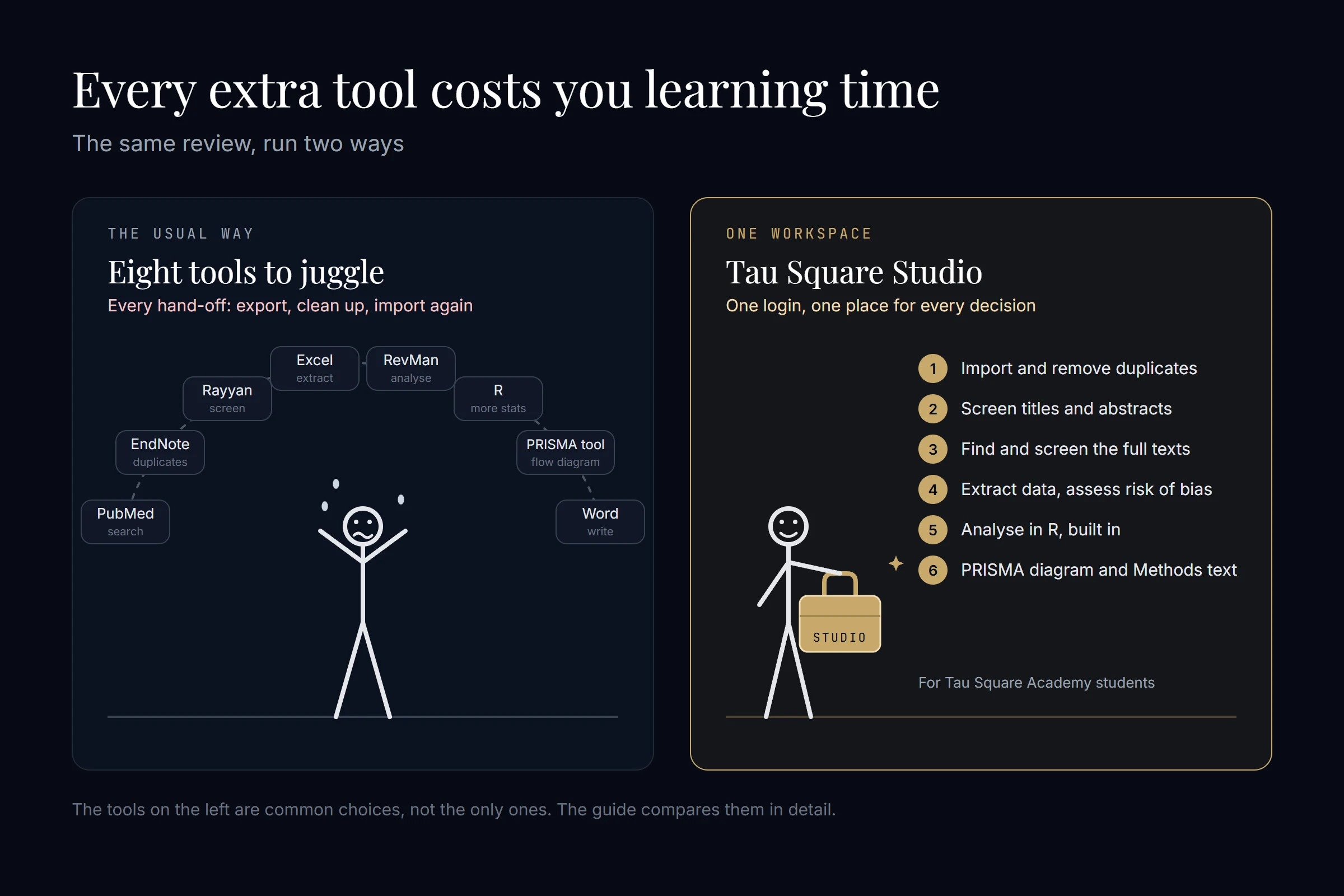
A typical student review crosses five or six programs: a database, a reference manager, a screening tool, a spreadsheet, the analysis software and something to draw the PRISMA diagram. None is hard on its own. Together they're a lot to learn at once, and every time you retype numbers from one program into another, you can introduce an error; the Cochrane Handbook counts avoiding manual re-entry as a reason to use electronic forms (chapter 5).
That's why some platforms cover several stages. Covidence, EPPI-Reviewer and DistillerSR take you from screening to extraction, and EPPI-Reviewer and Nested Knowledge add meta-analysis. Tau Square Studio, made by Tau Square Academy, runs the whole review in one workspace: import and duplicates, blind screening with a partner, full texts, extraction and risk of bias, then point-and-click meta-analysis on R and metafor with the R script that reproduces every number, the PRISMA 2020 diagram and a draft of your Methods. It's only for Tau Square Academy students, runs in Chrome or Edge on a laptop or desktop, and doesn't do network or Bayesian meta-analysis yet (Tau Square Studio).
Can AI do a meta-analysis for you?
Not on its own. AI tools can rank records for screening and suggest values for extraction, but a 2025 scoping review found that validated tools for these jobs are still scarce (Lieberum et al., 2025). Cochrane, Campbell, JBI and the Collaboration for Environmental Evidence say you stay responsible for every judgement and must report any AI you used (joint position statement, 2025). The pooled estimate itself still comes from ordinary meta-analysis software.
Here's where some of the main tools stand, from their own pages and one independent test:
- Covidence: suggests values for 24 study-characteristics fields using Google's Gemini models, switched on by default; the suggestions need the full text, and you accept or change each one (Covidence help).
- Elicit: reports high accuracy for its own screening and extraction (Elicit), but an independent test on 20 trials found its extraction only partly correct and in need of a human double-check (Bianchi et al., 2025).
- EPPI-Reviewer: offers coding with large language models, but says it's "for evaluation purposes only" and doesn't recommend it in real reviews without formal accuracy testing (EPPI-Reviewer).
- Tau Square Studio: its τ² AI points to the sentence, page and table cell behind each value, Studio's own code checks that the number is really there, and a person confirms it before it counts (Tau Square Studio).
Whatever you use, report it. PRISMA 2020 asks you to name any automation tools used in screening (item 8), and the joint position statement asks for each AI tool's name, version and dates, what it did, how you checked it, and its limitations.
Which meta-analysis software should you choose?
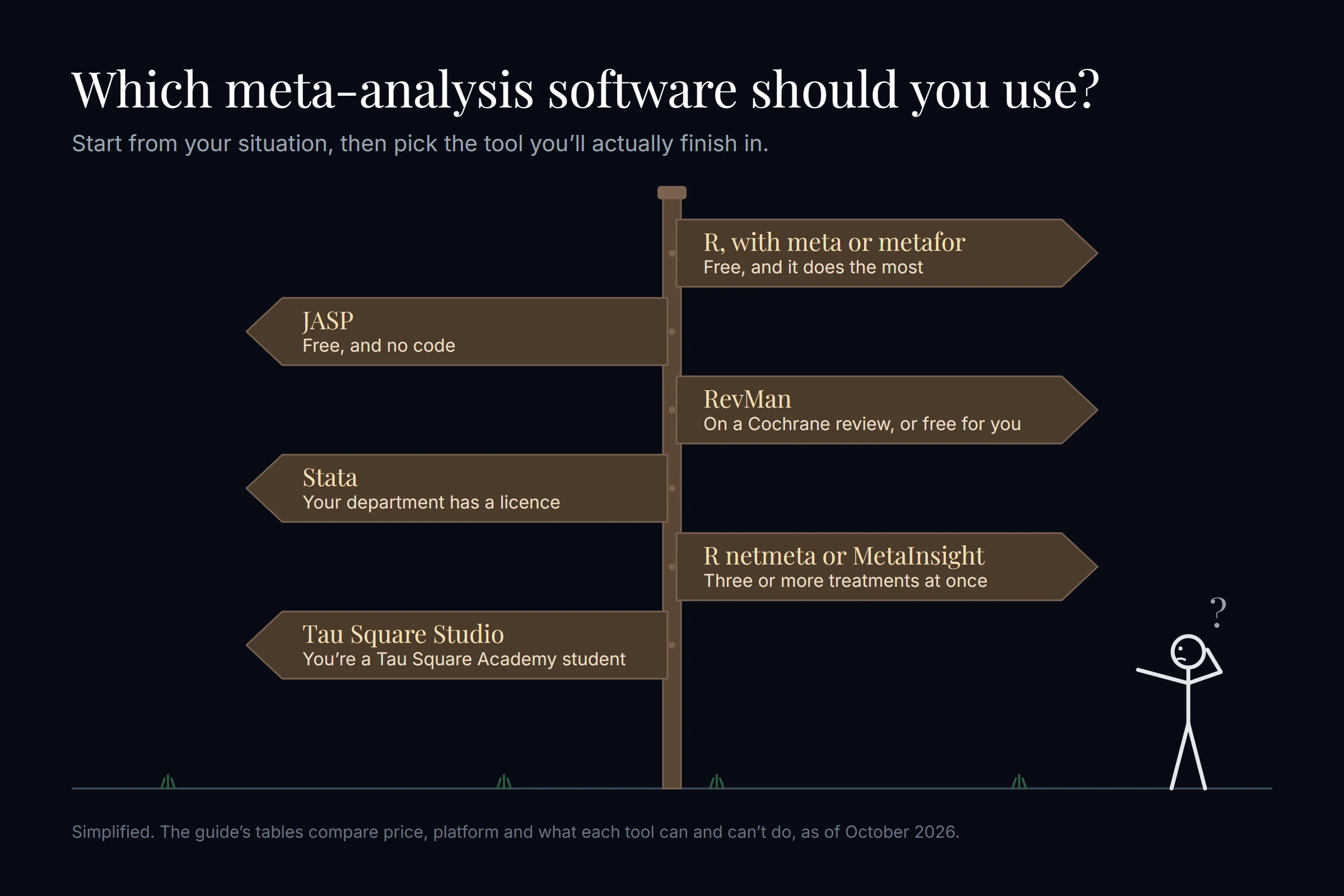
Choose by your situation, not by the longest feature list, and if nothing below fits better, start with R and the meta package. Find your situation here:
| Your situation | Use | Why |
|---|---|---|
| You live in a Research4Life country such as Nepal, Bangladesh or Kenya, and your review compares two groups | RevMan | It may be free for you, it's the gentlest start, and it follows Cochrane's methods |
| You live in India or elsewhere outside Research4Life, with no sponsored access | R (meta package) | It's free; RevMan would cost you £80 a year |
| You'd rather never write code | JASP | It's free and point-and-click, with metafor doing the statistics |
| Several of your studies report medians and IQRs, or you're pooling a prevalence | R (meta package) | RevMan doesn't convert medians, and its methods compare two groups |
| You're comparing three or more treatments | R (netmeta) or MetaInsight | RevMan can't run a network meta-analysis |
| Your department already uses Stata, CMA or SPSS, and someone there can check your work | That program | Local help is worth more than any feature list |
Whichever you choose, learn it in this order:
- Decide whether to pool at all: pooling studies that are too different gives a precise-looking wrong answer, and no software will stop you (Cochrane Handbook, chapter 10).
- Reproduce a published meta-analysis: rerun a recent review's forest plot in your tool with the effect measure, model and estimator the authors reported (older reviews mostly used DerSimonian and Laird). If your numbers match, your setup is right. It's the pottery-class lesson: you learn by making pots, not by reading about clay.
- Then run your own: with your effect measure, model and sensitivity analyses already written into your registered protocol.
If you haven't started the review itself, the guide to doing a systematic review as a medical student covers the steps before the statistics. Short on time? The guide to starting research in your final year has a five-month plan.
How do you report meta-analysis software in your paper?
Name the program and its version, each package and its version, the between-study variance estimator and the method for the confidence interval. PRISMA 2020's explanation of item 13d asks for exactly these, with examples such as metan in Stata 16 and metafor 2.1-0 (PRISMA 2020, item 13d). PRISMA doesn't ask for any particular program, only that you say which one you used and how.
- Leaving the version out of your methods: give the version of RevMan or of each R package, not just the name. Why: defaults change; RevMan's default estimator is now REML, where it used to be DerSimonian and Laird (chapter 10). Cochrane's style manual shows how to cite RevMan with its version (Cochrane).
- Treating I² as a traffic light: an I² of 60% isn't an automatic stop. Why: the Cochrane Handbook's bands overlap (0% to 40% might not be important, 75% to 100% is considerable), and how much a value matters depends on the size and direction of the effects and the strength of the evidence for heterogeneity (chapter 10).
- Calling your review a "Cochrane review" because you made it in RevMan: say it follows Cochrane methods instead. Why: RevMan's subscription terms forbid labelling anything made in RevMan a Cochrane Review unless Cochrane accepts it for publication (clause 3.4); the guide to what a Cochrane review is explains the difference.
Frequently asked questions
Is RevMan free?
Only for some people. As of October 2026, RevMan is free for authors working on Cochrane reviews and for people living in Research4Life countries, and some universities sponsor access for their students. A practice review is free, but it's deleted after 30 days and can't be exported. Everyone else pays a yearly subscription: £130 standard, £100 for academics or £80 for students, plus VAT in the UK and EU.
What is the best free software for meta-analysis?
For most students, R with the meta or metafor package. It's free on Windows, Mac and Linux, runs every analysis a first meta-analysis needs, and adds meta-regression, network and Bayesian meta-analysis later. If you'd rather not write code, JASP is free, point-and-click and runs metafor underneath. RevMan is free only for Cochrane review authors and people living in Research4Life countries (October 2026).
Is RevMan 5.4 still available for free download?
Not from Cochrane, as far as we could find in October 2026. Cochrane says RevMan 5 is no longer supported, and its old download page now redirects to a general learning page. Avoid free download copies on third-party sites. For a new review, use the current web version of RevMan or a free tool such as R. If you have an old .rm5 file, the current RevMan can create a new review from it.
Which software can do network meta-analysis?
R is the usual free choice: the netmeta package fits frequentist network meta-analysis, and gemtc or multinma fit Bayesian ones. MetaInsight is a free web app built on R for people who don't code, and CINeMA helps you judge confidence in the results. Stata users rely on the community network package. RevMan can't run a network meta-analysis, and JASP lists it as planned (October 2026).
Is Comprehensive Meta-Analysis (CMA) free?
No. Comprehensive Meta-Analysis is a paid, point-and-click program built only for meta-analysis, and what you get depends on the edition you buy. Check the current student price on meta-analysis.com before you pay. R and JASP cover the same everyday analyses for free, so CMA makes most sense when your team already uses it and someone there can check your work.
Can SPSS do meta-analysis?
Yes, from version 28 (2021). IBM SPSS Statistics includes meta-analysis of continuous and binary outcomes, with REML by default, the Knapp-Hartung adjustment, prediction intervals, subgroup analysis, meta-regression, Egger's test, trim-and-fill, and forest and funnel plots. It doesn't do network or Bayesian meta-analysis. SPSS is paid, so it's mainly worth using when your college already has a licence.
Can jamovi do meta-analysis?
Yes, through free add-on modules from the jamovi library, and jamovi itself is free and open source. MetaJam is built on the R package meta and covers two-group and single-group analyses. The older MAJOR module, built on metafor, has had maintenance problems: users were still reporting errors in January 2026. Whichever module you use, name it and its version in your methods.
Does RevMan convert median and IQR to mean and SD?
Not according to Cochrane's documentation, checked in October 2026. RevMan's calculator converts standard errors and confidence intervals into standard deviations and combines study arms, but it doesn't list median or IQR conversion. In R, the meta package can estimate means and SDs from medians, quartiles and ranges. The Cochrane Handbook warns that with skewed data you can't estimate an SD from an IQR.
Ready to start? Phase 0 is free: 14 short lessons, no card needed. If you’d rather talk first, a doctor from our team will map your next three steps on a free 15-minute call.
Start Phase 0 free or book a free callTau Square Academy Research Team
A team of doctors, research mentors and educational psychologists
Written and fact-checked by the Tau Square Academy research team: the team of doctors, research mentors and educational psychologists who designed the 100-Hour Research Protocol and teach every cohort. Every fact links to its source, and we update guides when things change.